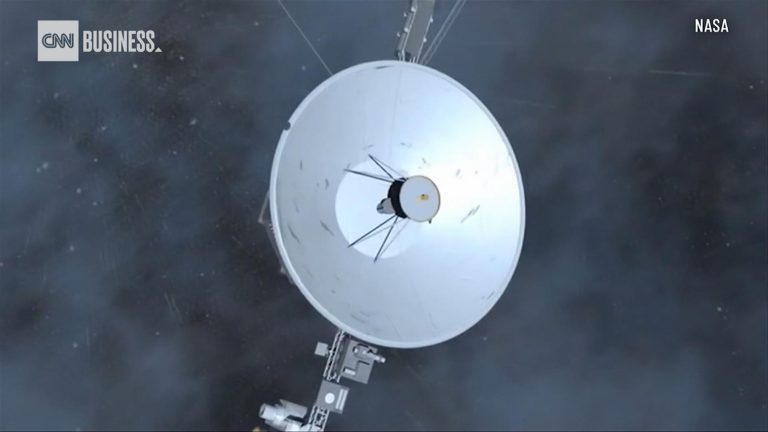
The Voyager mission team at NASA has been able to detect a signal from Voyager 2 after losing contact with the spacecraft, which has been operating for nearly 46 years.
“We enlisted the help of the (Deep Space Network) and Radio Science groups to help to see if we could hear a signal from Voyager 2,” said Suzanne Dodd, Voyager’s project manager at NASA’s Jet Propulsion Laboratory in Pasadena, California. “This was successful in that we see the ‘heartbeat’ signal from the spacecraft. So, we know the spacecraft is alive and operating. This buoyed our spirits.”
Commands sent to Voyager 2 on July 21 accidentally caused the spacecraft’s antenna to point 2 degrees away from Earth. The miniscule shift means that Voyager 2 can’t receive any commands from mission control or send data back to Earth from its location more than 12.3 billion miles (19.9 billion kilometers) in interstellar space.
The mission team was pleasantly surprised to be able to detect the spacecraft’s “carrier signal” using the Deep Space Network, an international array of massive radio antennas that allows NASA to communicate with missions across the cosmos.
Each of the three giant dishes are equidistant, meaning that one is always in communication with different spacecraft as Earth rotates. One radio antenna is located at Goldstone near Barstow, California, the second near Madrid, and the third near Canberra, Australia.
Now, the mission team will attempt to send a signal back to the spacecraft.
“We are now generating a new command to attempt to point the spacecraft antenna toward Earth,” Dodd said. “There is a low probability that this will work.”
‘Shouting’ into the cosmos
The signal, sent via the Deep Space Network, is basically an attempt to “shout” at Voyager 2 and try to get its attention, despite the fact that its antenna isn’t oriented in a way to receive the radio signal, according to NASA.
Given the distance between Voyager 2 and Earth, it takes about 18.5 hours for the signal to travel one way across the solar system to the spacecraft.
If the Earth-based signals don’t reach Voyager 2, the spacecraft is already programmed to reorient itself multiple times a year to keep its antenna pointing in Earth’s direction. The next reset was already scheduled for October 15, and the team is hopeful that this program will allow communications to resume with Voyager 2.
“But that is a long time to wait, so (we) will try sending up commands several times prior to that date,” Dodd said.
It’s not the first time that the aging twin probes, both launched in 1977, have experienced issues. As these “senior citizens” continue exploring the cosmos, the team has slowly turned off instruments to conserve power and extend their missions. Along the way, both Voyager 1 and 2 have encountered unexpected issues and dropouts, including a seven-month period where Voyager 2 and the Deep Space Network couldn’t communicate in 2020.
The team expects that Voyager 2 will remain on its planned trajectory, even without receiving commands. Meanwhile, Voyager 1, which is nearly 15 billion miles (24 billion kilometers) from Earth, continues to operate as expected and communicate with the Deep Space Network.
Both are in interstellar space and the only spacecraft to operate beyond the heliosphere, the sun’s bubble of magnetic fields and particles that extends well beyond the orbit of Pluto, collecting valuable data as they explore uncharted interstellar territory.
By: Ashley Strickland, CNN Originally published at CNN
Is there life on Venus? People have asked this question for as long as we’ve known that the bright object in the morning and evening skies was a planet.
Back when optical telescopes were the only tools humans had to peer into space, all we could see of our nearest celestial neighbor was a cloud-shrouded planet. Some scientists at the time thought that Venus might not be too different from Earth, since both planets are of similar size and have atmospheres. Perhaps, they thought, Venus was covered in humid swamps, filled with exotic alien creatures. In the 1960s when NASA and the Soviet space agency started using radar imaging technology to look beneath Venus’ clouds, this perception changed dramatically.
Today, we know Venus to be an extremely inhospitable environment. And yet the question of whether it could be home to life is still up for debate as scientists continue to discover new things about the mysterious world.
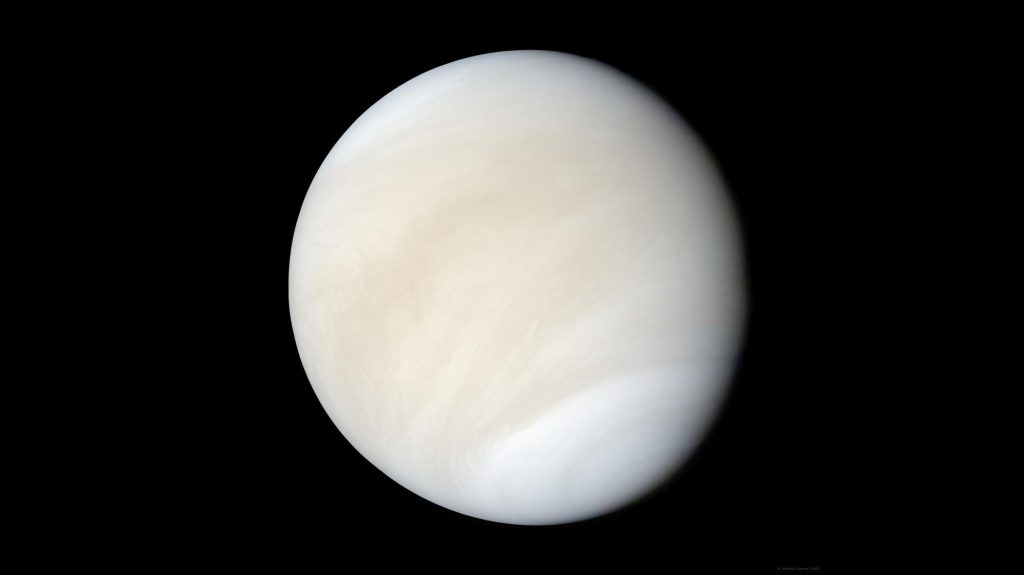
VENUS A global view of Venus created using images from NASA’s Mariner 10 spacecraft.Image: NASA/JPL/Mattias Malmer
What is Venus like today?
With extreme heat and crushing atmospheric pressure, the surface of Venus today is one of the deadliest environments in the Solar System.
Venus is the hottest planet in the Solar System, even though Mercury is twice as close to the Sun and receives four times more solar energy. At the surface, Venus has average temperatures of 470 degrees Celsius (878 degrees Fahrenheit) — hot enough to melt lead.
Venus is so hot because of its thick carbon dioxide atmosphere, which traps heat creating a runaway greenhouse effect. Fifty-four times more dense than Earth’s, it is the densest terrestrial atmosphere in the Solar System. The atmospheric pressure on the surface of Venus is about 92 bar, or 1,350 pounds per square inch. This is the equivalent of the pressure you’d experience if you were a kilometer (about 0.6 miles) underwater on Earth.
What was Venus like in the past?
Although Venus is a hellscape today, it likely used to have similar conditions to Earth: oceans of liquid water, a mild climate, and other characteristics that may have made it habitable.
Past missions to Venus have found evidence of granite-like rocks that would have required the presence of water to form. Because of hints like this, some scientists think the planet may have had liquid water on its surface for 2 billion years — far longer than Mars, which likely hosted surface water for a relatively brief 300 million years.
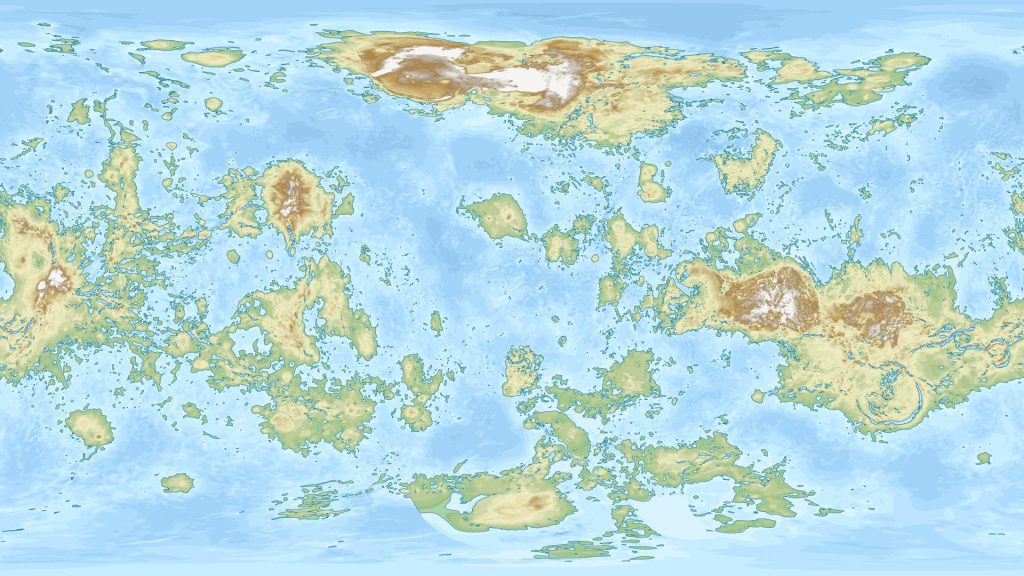
VENUS IF IT HAD OCEANS Data scientist Alexis Huet created this map showing what Venus would look like if it had the same amount of surface water as Earth.Image: Alexis Huet
Did life exist on Venus in the past?
Because liquid water is the key to life as we know it, if Venus had water on its surface for billions of years it’s possible that microbial life emerged during that time. We don’t know for sure, though, and looking for evidence of past life on Venus is almost impossible with current technologies.
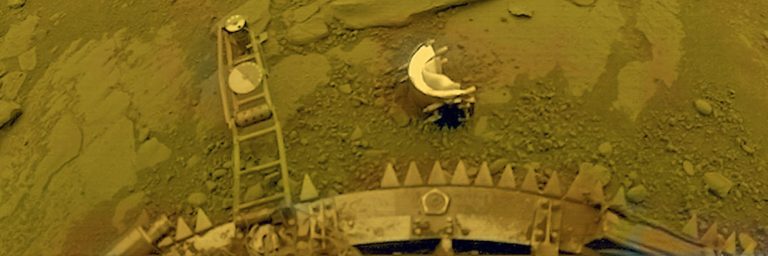
Although orbiters can teach us a lot about a planet, to search for signs of past life we need to take a much closer look. On Mars, we look for past microbial life by sending rovers like Curiosity and Perseverance to analyze rock samples. But Venus is a much more difficult place to explore on the surface. Only a handful of landers have successfully operated on the Venusian surface. Many more have tried and failed, but even the successful missions were only able to operate for hours at most before being destroyed by the planet’s extreme conditions. This doesn’t give spacecraft enough time to do things like collect and analyze rock samples to look for microscopic fossils.
Does life exist on Venus now?
Although life as we know it is almost certainly impossible in the harsh conditions on the surface of Venus, it’s possible that it could survive in the Venusian atmosphere. Although Venus’ lower atmosphere contains toxic clouds of sulfuric acid, at higher levels the conditions are much less deadly.
In 2020 scientists announced they found phosphine gas — a potential biosignature, i.e. a chemical strongly associated with biological processes — in Venus’ clouds 50 kilometers (roughly 31 miles) above the surface, where temperatures and pressures are much more Earth-like. Phosphine’s presence has since been disputed, then later reclaimed but with an alternative explanation for its origins, disputed once again, and redetected lower in the atmosphere. The verdict on whether phosphine exists in the clouds of Venus, and whether its presence would mean there were life forms producing it, is still very much undecided.
By: Kate Howells Originally published at The Planetary Society
LPython is a Python compiler that can compile type-annotated Python code to optimized machine code. LPython offers several backends such as LLVM, C, C++, WASM, Julia and x86. LPython features quick compilation and runtime performance, as we show in the benchmarks in this blog. LPython also offers Just-In-Time (JIT) compilation and seamless interoperability with CPython.
We are releasing an alpha version of LPython, meaning it is expected you encounter bugs when you use it (please report them!). You can install it using Conda (conda install -c conda-forge lpython), or build from source.
Based on the novel Abstract Semantic Representation (ASR) shared with LFortran, LPython’s intermediate optimizations are independent of the backends and frontends. The two compilers, LPython and LFortran, share all benefits of improvements at the ASR level. “Speed” is the chief tenet of the LPython project. Our objective is to produce a compiler that both runs exceptionally fast and generates exceptionally fast code.
In this blog, we describe features of LPython including Ahead-of-Time (AoT) compilation, JIT compilation, and interoperability with CPython. We also showcase LPython’s performance against its competitors such as Numba and C++ via several benchmarks.
Features of LPython
Backends
LPython ships with the following backends, which emit final translations of the user’s input code:
LLVM
C
C++
WASM
LPython can simultaneously generate code into multiple backends from its Abstract Semantic Representation (ASR) of user code.
Phases of Compilation
First, input code is transformed into an Abstract Syntax Tree (AST) using parsers. The AST is then transformed into an Abstract Semantic Representation (ASR), which preserves all semantic information present in the input code. ASR contains all information required by all backends in a form that is not specific to any particular backend. Then, this ASR enjoys several ASR-to-ASR passes, wherein abstract operations are transformed into concrete statements. For example, array addition in the input code denoted, c = a + b. The front end transforms c = a + b into the ASR (Assign c (ArrayAdd a b)) via operator overloading. The array_op ASR-to-ASR pass transforms (Assign c (ArrayAdd a b)) into loops:
for i0 in range(0, length_dim_0):
    for i1 in range(0, length_dim_1):
        ....
            ....
            c[i0, i1, ...] = a[i0, i1, ...] + b[i0, i1, ...]
After applying all the ASR-to-ASR passes, LPython sends the final ASR to the backends selected by the user, via command-line arguments like, --show-c (generates C code), --show-llvm (generates LLVM code).
One can also see the generated C or LLVM code using the following
from lpython import i32
def main():
    x: i32
    x = (2+3)*5
    print(x)
main()
LPython implements several machine-independent optimisations via ASR-to-ASR passes. Some of those are listed below,
Loop unrolling
Loop vectorisation
Dead code removal
Function call inlining
Transforming division to multiplication operation
Fused multiplication and addition
All optimizations are applied via one command-line argument, --fast. To select individual optimizations instead, write a command-line argument like the following:
--pass=inline_function_calls,loop_unroll
Following is an examples of ASR and transformed ASR after applying the optimisations
LPython naturally acts as a Python compiler. By default, if no backend is provided it compiles type-annotated user input code to LLVM, which generates binary final output. Consider the following small example:
from lpython import i32, i64
def list_bench(n: i32) -> i64:
    x: list[i32]
    x = []
    i: i32
    for i in range(n):
        x.append(i)
    s: i64 = i64(0)
    for i in range(n):
        s += i64(x[i])
    return s
res: i64 = list_bench(500_000)
print(res)
(lp) 18:58:29:~/lpython_project/lpython % lpython /Users/czgdp1807/lpython_project/debug.py -o a.out
(lp) 18:58:31:~/lpython_project/lpython % time ./a.out
124999750000
./a.out  0.01s user 0.00s system 89% cpu 0.012 total
You can see that it’s very fast. It’s still plenty fast with the C backend via the command-line argument --backend=c:
% time lpython /Users/czgdp1807/lpython_project/debug.py --backend=c
124999750000
lpython /Users/czgdp1807/lpython_project/debug.py --backend=c  0.12s user 0.02s system 100% cpu 0.144 total
Note that time lpython /Users/czgdp1807/lpython_project/debug.py --backend=c includes both the compilation time of LPython and the execution time of the binary. The sum of both is so fast that one can afford to compile on every change to the input files. :D.
Just-In-Time Compilation
Just-in-time compilation in LPython requires only decorating Python function with @lpython. The decorator takes an option for specifying the desired backend, as in, @lpython(backend="c") or @lpython(backend="llvm"). Only C is supported at present; LLVM and others will be added in the near future. The decorator also propagates backend-specific options. For example
Note that by default C backend is used without any optimisation flags.
A small example of JIT compilation in LPython (notice the LPython type annotations with the variables),
from lpython import i32, i64, lpython
@lpython(backend="c", backend_optimisation_flags=["-ffast-math", "-funroll-loops", "-O1"])
def list_bench(n: i32) -> i64:
    x: list[i32]
    x = []
    i: i32
    for i in range(n):
        x.append(i)
    s: i64 = i64(0)
    for i in range(n):
        s += i64(x[i])
    return s
res = list_bench(1) # compiles `list_bench` to a shared binary in the first call
res = list_bench(500_000) # calls the compiled `list_bench`
print(res)
We show below in the benchmarks how LPython compares to Numba, which also has JIT compilation.
Inter-operability with CPython
Access any library implemented using CPython, via the @pythoncall decorator. For example,
email_extractor.py
# get_email is implemented in email_extractor_util.py which is intimated to
# LPython by specifiying the file as module in `@pythoncall` decorator
@pythoncall(module="email_extractor_util")
def get_email(text: str) -> str:
    pass
def test():
    text: str = "Hello, my email id is [email protected]."
    print(get_email(text))
test()
Note: The @pythoncall and @lpython decorators are presently supported with just the C backend but eventually will work with the LLVM backend and that’s work in progress.
Benchmarks and Demos
In this section, we show how LPython performs compares to competitors on each feature LPython offers. We cover JIT compilation, Interoperability with CPython, and AoT compilation.
Just-In-Time (JIT) Compilation
We compare JIT compilation of LPython to Numba on summation of all the elements of a 1-D array, pointwise multiplication of two 1-D arrays, insertion sort on lists, and quadratic-time implementation of the Dijkstra shortest-path algorithm on a fully connected graph.
System Information
Compiler
Version
Numba
0.57.1
LPython
0.19.0
Python
3.10.4
Summation of all the elements of a 1-D array
from numpy import float64, arange, empty
from lpython import i32, f64, lpython
import timeit
from numba import njit
@lpython(backend="c", backend_optimisation_flags=["-ffast-math", "-funroll-loops", "-O3"])
def fast_sum(n: i32, x: f64[:], res: f64[:]) -> f64:
    s: f64 = 0.0
    res[0] = 0.0
    i: i32
    for i in range(n):
        s += x[i]
    res[0] = s
    return s
@njit(fastmath=True)
def fast_sum_numba(n, x, res):
    s = 0.0
    res[0] = 0.0
    for i in range(n):
        s += x[i]
    res[0] = s
    return s
def test():
    n = 100_000_000
    x = arange(n, dtype=float64)
    x1 = arange(0, dtype=float64)
    res = empty(1, dtype=float64)
    res_numba = empty(1, dtype=float64)
    print("LPython compilation time:", timeit.timeit(lambda: fast_sum(0, x1, res), number=1))
    print("LPython execution time: ", min(timeit.repeat(lambda: fast_sum(n, x, res), repeat=10, number=1)))
    assert res[0] == 4999999950000000.0
    print("Numba compilation time:", timeit.timeit(lambda: fast_sum_numba(0, x1, res_numba), number=1))
    print("Numba execution time:", min(timeit.repeat(lambda: fast_sum_numba(n, x, res_numba), repeat=10, number=1)))
    assert res_numba[0] == 4999999950000000.0
test()
Compiler
Compilation Time (s)
System
Relative
Numba
0.10
Apple M1 MBP 2020
1.00
LPython
0.20
Apple M1 MBP 2020
2.00
Numba
0.08
Apple M1 Pro MBP 2021
1.00
LPython
0.53
Apple M1 Pro MBP 2021
6.62
Numba
0.15
Apple M1 2020
1.00
LPython
0.40
Apple M1 2020
2.67
Numba
0.20
AMD Ryzen 5 2500U (Ubuntu 22.04)
1.00
LPython
0.32
AMD Ryzen 5 2500U (Ubuntu 22.04)
1.60
Compiler
Execution Time (s)
System
Relative
LPython
0.013
Apple M1 MBP 2020
1.00
Numba
0.024
Apple M1 MBP 2020
1.84
LPython
0.013
Apple M1 Pro MBP 2021
1.00
Numba
0.023
Apple M1 Pro MBP 2021
1.77
LPython
0.014
Apple M1 2020
1.00
Numba
0.024
Apple M1 2020
1.71
LPython
0.048
AMD Ryzen 5 2500U (Ubuntu 22.04)
1.00
Numba
0.048
AMD Ryzen 5 2500U (Ubuntu 22.04)
1.00
Pointwise multiplication of two 1-D arrays
from numpy import int64, arange, empty
from lpython import i32, i64, lpython
import timeit
from numba import njit
@lpython(backend="c", backend_optimisation_flags=["-ffast-math", "-funroll-loops", "-O3"])
def multiply_arrays(n: i32, x: i64[:], y: i64[:], z: i64[:]):
    i: i32
    for i in range(n):
        z[i] = x[i] * y[i]
@njit(fastmath=True)
def multiply_arrays_numba(n, x, y, z):
    for i in range(n):
        z[i] = x[i] * y[i]
def test():
    n = 100_000_000
    x1 = arange(0, dtype=int64)
    y1 = arange(0, dtype=int64)
    res1 = arange(0, dtype=int64)
    x = arange(n, dtype=int64)
    y = arange(n, dtype=int64) + 2
    res = empty(n, dtype=int64)
    res_numba = empty(n, dtype=int64)
    print("LPython compilation time:", timeit.timeit(lambda: multiply_arrays(0, x1, y1, res1), number=1))
    print("LPython execution time:", min(timeit.repeat(lambda: multiply_arrays(n, x, y, res), repeat=10, number=1)))
    assert sum(res - x * y) == 0
    print("Numba compilation time:", timeit.timeit(lambda: multiply_arrays_numba(0, x1, y1, res1), number=1))
    print("Numba execution time:", min(timeit.repeat(lambda: multiply_arrays_numba(n, x, y, res_numba), repeat=10, number=1)))
    assert sum(res_numba - x * y) == 0
test()
Compiler
Compilation Time (s)
System
Relative
Numba
0.11
Apple M1 MBP 2020
1.00
LPython
0.50
Apple M1 MBP 2020
4.54
Numba
0.09
Apple M1 Pro MBP 2021
1.00
LPython
0.60
Apple M1 Pro MBP 2021
6.67
Numba
0.11
Apple M1 2020
1.00
LPython
0.46
Apple M1 2020
4.18
Numba
0.21
AMD Ryzen 5 2500U (Ubuntu 22.04)
1.00
LPython
0.31
AMD Ryzen 5 2500U (Ubuntu 22.04)
1.48
Compiler
Execution Time (s)
System
Relative
Numba
0.041
Apple M1 MBP 2020
1.00
LPython
0.042
Apple M1 MBP 2020
1.02
Numba
0.037
Apple M1 Pro MBP 2021
1.00
LPython
0.040
Apple M1 Pro MBP 2021
1.08
Numba
0.042
Apple M1 2020
1.00
LPython
0.042
Apple M1 2020
1.00
Numba
0.21
AMD Ryzen 5 2500U (Ubuntu 22.04)
1.00
LPython
0.21
AMD Ryzen 5 2500U (Ubuntu 22.04)
1.00
Insertion sort on lists
from lpython import i32, lpython
import timeit
from numba import njit
@lpython(backend="c", backend_optimisation_flags=["-ffast-math", "-funroll-loops", "-O3"])
def test_list_sort(size: i32):
    i: i32
    x: list[i32]
    x = []
    for i in range(size):
        x.append(size - i)
    for i in range(1, size):
        key: i32 = x[i]
        j: i32 = i - 1
        while j >= 0 and key < x[j] :
            x[j + 1] = x[j]
            j -= 1
        x[j + 1] = key
    for i in range(1, size):
        assert x[i - 1] < x[i]
@njit(fastmath=True)
def test_list_sort_numba(size):
    x = []
    for i in range(size):
        x.append(size - i)
    for i in range(1, size):
        key = x[i]
        j = i - 1
        while j >= 0 and key < x[j] :
            x[j + 1] = x[j]
            j -= 1
        x[j + 1] = key
    for i in range(1, size):
        assert x[i - 1] < x[i]
def test():
    n = 25000
    print("LPython compilation time:", timeit.timeit(lambda: test_list_sort(0), number=1))
    print("LPython execution time:", min(timeit.repeat(lambda: test_list_sort(n), repeat=10, number=1)))
    print("Numba compilation time:", timeit.timeit(lambda: test_list_sort_numba(0), number=1))
    print("Numba execution time:", min(timeit.repeat(lambda: test_list_sort_numba(n), repeat=10, number=1)))
test()
Compiler
Compilation Time (s)
System
Relative
Numba
0.13
Apple M1 MBP 2020
1.00
LPython
0.20
Apple M1 MBP 2020
1.54
Numba
0.13
Apple M1 Pro MBP 2021
1.00
LPython
0.60
Apple M1 Pro MBP 2021
4.62
Numba
0.13
Apple M1 2020
1.00
LPython
0.42
Apple M1 2020
3.23
Numba
0.35
AMD Ryzen 5 2500U (Ubuntu 22.04)
1.00
LPython
0.37
AMD Ryzen 5 2500U (Ubuntu 22.04)
1.06
Compiler
Execution Time (s)
System
Relative
LPython
0.11
Apple M1 MBP 2020
1.00
Numba
0.39
Apple M1 MBP 2020
3.54
LPython
0.11
Apple M1 Pro MBP 2021
1.00
Numba
0.39
Apple M1 Pro MBP 2021
3.54
LPython
0.20
Apple M1 2020
1.00
Numba
0.39
Apple M1 2020
1.95
LPython
0.10
AMD Ryzen 5 2500U (Ubuntu 22.04)
1.00
Numba
0.36
AMD Ryzen 5 2500U (Ubuntu 22.04)
3.60
Quadratic-time implementation of the Dijkstra shortest-path algorithm on a fully connected graph
from lpython import i32, lpython
from numpy import empty, int32
from numba import njit
import timeit
@lpython(backend="c", backend_optimisation_flags=["-ffast-math", "-funroll-loops", "-O1"])
def dijkstra_shortest_path(n: i32, source: i32, dist_sum: i32[:]):
    i: i32; j: i32; v: i32; u: i32; mindist: i32; alt: i32; dummy: i32;
    graph: dict[i32, i32] = {}
    dist: dict[i32, i32] = {}
    prev: dict[i32, i32] = {}
    visited: dict[i32, bool] = {}
    Q: list[i32] = []
    for i in range(n):
        for j in range(n):
            graph[n * i + j] = abs(i - j)
    for v in range(n):
        dist[v] = 2147483647
        prev[v] = -1
        Q.append(v)
        visited[v] = False
    dist[source] = 0
    while len(Q) > 0:
        u = -1
        mindist = 2147483647
        for i in range(len(Q)):
            if mindist > dist[Q[i]]:
                mindist = dist[Q[i]]
                u = Q[i]
        Q.remove(u)
        visited[u] = True
        for v in range(n):
            if v != u and not visited[v]:
                alt = dist[u] + graph[n * u + v]
                if alt < dist[v]:
                    dist[v] = alt
                    prev[v] = u
    dist_sum[0] = 0
    for i in range(n):
        dist_sum[0] += dist[i]
@njit(fastmath=True)
def dijkstra_shortest_path_numba(n, source, dist_sum):
    graph = {}
    dist = {}
    prev = {}
    visited = {}
    Q = []
    for i in range(n):
        for j in range(n):
            graph[n * i + j] = abs(i - j)
    for v in range(n):
        dist[v] = 2147483647
        prev[v] = -1
        Q.append(v)
        visited[v] = False
    dist[source] = 0
    while len(Q) > 0:
        u = -1
        mindist = 2147483647
        for i in range(len(Q)):
            if mindist > dist[Q[i]]:
                mindist = dist[Q[i]]
                u = Q[i]
        Q.remove(u)
        visited[u] = True
        for v in range(n):
            if v != u and not visited[v]:
                alt = dist[u] + graph[n * u + v]
                if alt < dist[v]:
                    dist[v] = alt
                    prev[v] = u
    dist_sum[0] = 0
    for i in range(n):
        dist_sum[0] += dist[i]
def test():
    n: i32 = 4000
    dist_sum_array_numba = empty(1, dtype=int32)
    dist_sum_array = empty(1, dtype=int32)
    print("LPython compilation time: ", timeit.timeit(lambda: dijkstra_shortest_path(0, 0, dist_sum_array), number=1))
    print("LPython execution time: ", min(timeit.repeat(lambda: dijkstra_shortest_path(n, 0, dist_sum_array), repeat=5, number=1)))
    print(dist_sum_array[0])
    assert dist_sum_array[0] == i32(n * (n - 1)/2)
    print("Numba compilation time: ", timeit.timeit(lambda: dijkstra_shortest_path_numba(0, 0, dist_sum_array_numba), number=1))
    print("Numba execution time: ", min(timeit.repeat(lambda: dijkstra_shortest_path_numba(n, 0, dist_sum_array_numba), repeat=5, number=1)))
    print(dist_sum_array_numba[0])
    assert dist_sum_array_numba[0] == i32(n * (n - 1)/2)
test()
Compiler
Compilation Time (s)
System
Relative
LPython
0.35
Apple M1 MBP 2020
1.00
Numba
0.81
Apple M1 MBP 2020
2.31
LPython
0.69
Apple M1 Pro MBP 2021
1.00
Numba
0.73
Apple M1 Pro MBP 2021
1.05
LPython
0.21
Apple M1 2020
1.00
Numba
0.73
Apple M1 2020
3.47
LPython
1.08
AMD Ryzen 5 2500U (Ubuntu 22.04)
1.00
Numba
1.69
AMD Ryzen 5 2500U (Ubuntu 22.04)
1.56
Compiler
Execution Time (s)
System
Relative
LPython
0.23
Apple M1 MBP 2020
1.00
Numba
1.01
Apple M1 MBP 2020
4.39
LPython
0.20
Apple M1 Pro MBP 2021
1.00
Numba
0.98
Apple M1 Pro MBP 2021
4.90
LPython
0.27
Apple M1 2020
1.00
Numba
0.98
Apple M1 2020
3.63
LPython
0.87
AMD Ryzen 5 2500U (Ubuntu 22.04)
1.00
Numba
1.95
AMD Ryzen 5 2500U (Ubuntu 22.04)
2.24
Ahead-of-Time (AoT) Compilation
Next, we see how LPython compares to other AoT compilers and to the standard CPython interpreter. The tasks considered are quadratic-time implementation of the Dijkstra shortest-path algorithm on a fully connected graph, and Floyd-Warshall algorithm on array representation of graphs.
System Information
Compiler
Version
clang++
14.0.3
g++
11.3.0
LPython
0.19.0
Python
3.10.4
Quadratic-time implementation of the Dijkstra shortest-path algorithm on a fully connected graph
from lpython import i32
def dijkstra_shortest_path(n: i32, source: i32) -> i32:
    i: i32; j: i32; v: i32; u: i32; mindist: i32; alt: i32; dummy: i32; uidx: i32
    dist_sum: i32;
    graph: dict[i32, i32] = {}
    dist: dict[i32, i32] = {}
    prev: dict[i32, i32] = {}
    visited: dict[i32, bool] = {}
    Q: list[i32] = []
    for i in range(n):
        for j in range(n):
            graph[n * i + j] = abs(i - j)
    for v in range(n):
        dist[v] = 2147483647
        prev[v] = -1
        Q.append(v)
        visited[v] = False
    dist[source] = 0
    while len(Q) > 0:
        u = -1
        mindist = 2147483647
        for i in range(len(Q)):
            if mindist > dist[Q[i]]:
                mindist = dist[Q[i]]
                u = Q[i]
                uidx = i
        dummy = Q.pop(uidx)
        visited[u] = True
        for v in range(n):
            if v != u and not visited[v]:
                alt = dist[u] + graph[n * u + v]
                if alt < dist[v]:
                    dist[v] = alt
                    prev[v] = u
    dist_sum = 0
    for i in range(n):
        dist_sum += dist[i]
    return dist_sum
def test():
    n: i32 = 4000
    print(dijkstra_shortest_path(n, 0))
test()
#include <iostream>
#include <unordered_map>
#include <vector>
int32_t dijkstra_shortest_path(int32_t n, int32_t source) {
    int32_t i, j, v, u, mindist, alt, dummy, uidx;
    std::unordered_map<int32_t, int32_t> graph, dist, prev;
    std::unordered_map<int32_t, bool> visited;
    std::vector<int32_t> Q;
    for(i = 0; i < n; i++) {
        for(j = 0; j < n; j++) {
            graph[n * i + j] = std::abs(i - j);
        }
    }
    for(v = 0; v < n; v++) {
        dist[v] = 2147483647;
        prev[v] = -1;
        Q.push_back(v);
        visited[v] = false;
    }
    dist[source] = 0;
    while(Q.size() > 0) {
        u = -1;
        mindist = 2147483647;
        for(i = 0; i < Q.size(); i++) {
            if( mindist > dist[Q[i]] ) {
                mindist = dist[Q[i]];
                u = Q[i];
                uidx = i;
            }
        }
        Q.erase(Q.begin() + uidx);
        visited[u] = true;
        for(v = 0; v < n; v++) {
            if( v != u and not visited[v] ) {
                alt = dist[u] + graph[n * u + v];
                if( alt < dist[v] ) {
                    dist[v] = alt;
                    prev[v] = u;
                }
            }
        }
    }
    int32_t dist_sum = 0;
    for(i = 0; i < n; i++) {
        dist_sum += dist[i];
    }
    return dist_sum;
}
int main() {
    int32_t n = 4000;
    int32_t dist_sum = dijkstra_shortest_path(n, 0);
    std::cout<<dist_sum<<std::endl;
    return 0;
}
Compiler/Interpreter
Execution Time (s)
System
Relative
LPython
0.167
Apple M1 MBP 2020
1.00
Clang++
0.993
Apple M1 MBP 2020
5.95
Python
3.817
Apple M1 MBP 2020
22.86
LPython
0.155
Apple M1 Pro MBP 2021
1.00
Clang++
0.685
Apple M1 Pro MBP 2021
4.41
Python
3.437
Apple M1 Pro MBP 2021
22.17
LPython
0.324
Apple M1 2020
1.00
Clang++
0.709
Apple M1 2020
2.19
Python
3.486
Apple M1 2020
10.76
LPython
0.613
AMD Ryzen 5 2500U (Ubuntu 22.04)
1.00
g++
1.358
AMD Ryzen 5 2500U (Ubuntu 22.04)
2.21
Python
7.365
AMD Ryzen 5 2500U (Ubuntu 22.04)
12.01
Note the optimization flags furnished to each compiler.
Compiler/Interpreter
Optimization flags used
LPython
--fast
Clang++
-ffast-math -funroll-loops -O3
g++
-ffast-math -funroll-loops -O3
Python
–
Floyd-Warshall algorithm on array representation of graphs
from lpython import i64, i32
from numpy import empty, int64
def floyd_warshall(size: i32) -> i64:
    dist: i64[size, size] = empty((size, size), dtype=int64)
    u: i32; v: i32
    i: i32; j: i32; k: i32
    update: i64 = i64(0)
    for u in range(size):
        for v in range(size):
            dist[u, v] = i64(2147483647)
    for u in range(size):
        for v in range(size):
            if u != v and ((u%2 == 0 and v%2 == 1)
                           or (u%2 == 1 and v%2 == 0)):
                dist[u, v] = i64(u + v)
    for v in range(size):
        dist[v, v] = i64(0)
    update = i64(0)
    for k in range(size):
        for i in range(size):
            for j in range(size):
                if dist[i, j] > dist[i, k] + dist[k, j]:
                    update += dist[i, j] - dist[i, k] - dist[k, j]
                    dist[i, j] = dist[i, k] + dist[k, j]
    return update
print(floyd_warshall(1000))
Note the optimization flags furnished to each compiler.
Compiler/Interpreter
Optimization flags used
LPython
--fast
Clang++
-ffast-math -funroll-loops -O3
g++
-ffast-math -funroll-loops -O3
Python
–
Interoperability with CPython
Next we show that LPython can call functions in CPython libraries. This feature permits “break-out” to Numpy, TensorFlow, PyTorch, and even to matplotlib. The break-outs will run at ordinary (slow) Python speeds, but LPython accelerates the mathematical portions to near maximum speed.
Calling NumPy functions via CPython
main.py
from lpython import i32, f64, i64, pythoncall, Const, TypeVar
from numpy import empty, int32, float64
n_1 = TypeVar("n_1")
n_2 = TypeVar("n_2")
n_3 = TypeVar("n_3")
@pythoncall(module = "util")
def cpython_add(n_1: i32, a: i32[:], b: i32[:]) -> i32[n_1]:
    pass
@pythoncall(module = "util")
def cpython_multiply(n_1: i32, n_2: i32, a: f64[:], b: f64[:]) -> f64[n_1, n_2]:
    pass
def test_1D():
    n: Const[i32] = 500_000
    a: i32[n] = empty(n, dtype = int32)
    b: i32[n] = empty(n, dtype = int32)
    i: i32
    for i in range(n):
        a[i] = 2 * (i+1) * 13
        b[i] = a[i] + 2
    sum: i32[n]
    sum = cpython_add(500_000, a, b)
    for i in range(n):
        assert sum[i] == a[i] + b[i]
def test_2D():
    n: Const[i32] = 1_000
    a: f64[n] = empty([n], dtype = float64)
    b: f64[n] = empty([n], dtype = float64)
    i: i32; j: i32
    for i in range(n):
        a[i] = f64(i + 13)
        b[i] = i * 2 / (i + 1)
    product: f64[n, n]
    product = cpython_multiply(1_000, 1_000, a, b)
    for i in range(n):
        assert product[i] == a[i] * b[i]
def test():
    test_1D()
    test_2D()
test()
util.py
import numpy as np
def cpython_add(n, a, b):
    return np.add(a, b)
def cpython_multiply(n, m, a, b):
    return np.multiply(a, b)
(lp) 23:02:55:~/lpython_project % lpython main.py --backend=c --link-numpy
(lp) 23:03:10:~/lpython_project % # Works successfully without any asserts failing
Plotting graphs via Matplotlib
main.py
from lpython import f64, i32, pythoncall, Const
from numpy import empty, float64
@pythoncall(module = "util")
def plot_graph(x: f64[:], y1: f64[:], y2: f64[:], y3: f64[:]):
    pass
def f(x: f64, i: f64) -> f64:
    return x ** .5 / i
def test():
    n: Const[i32] = 100000
    x: f64[n] = empty(n, dtype=float64)
    y1: f64[n] = empty(n, dtype=float64)
    y2: f64[n] = empty(n, dtype=float64)
    y3: f64[n] = empty(n, dtype=float64)
    i: i32
    for i in range(1, n):
        x[i] = f64(i)
    for i in range(1, n):
        y1[i] = f(x[i], 1.)
        y2[i] = f(x[i], 2.)
        y3[i] = f(x[i], 3.)
    plot_graph(x, y1, y2, y3)
test()
(lp) 23:09:08:~/lpython_project % lpython main.py --backend=c --link-numpy
(lp) 23:10:44:~/lpython_project % # Works see the graph below
Visualization using Matplotlib: Mandelbrot Set
main.py
from lpython import i32, f64, pythoncall, TypeVar
from numpy import empty, int32
h = TypeVar("h")
w = TypeVar("w")
d = TypeVar("d")
@pythoncall(module="util")
def show_img_gray(w: i32, h: i32, A: i32[h, w]):
    pass
@pythoncall(module="util")
def show_img_color(w: i32, h: i32, d: i32, A: i32[h, w, d]):
    pass
def main0():
    Nx: i32 = 600; Ny: i32 = 450; Nz: i32 = 4; n_max: i32 = 255
    xcenter: f64 = f64(-0.5); ycenter: f64 = f64(0.0)
    width: f64 = f64(4); height: f64 = f64(3)
    dx_di: f64 = width/f64(Nx); dy_dj: f64 = -height/f64(Ny)
    x_offset: f64 = xcenter - f64(Nx+1)*dx_di/f64(2.0)
    y_offset: f64 = ycenter - f64(Ny+1)*dy_dj/f64(2.0)
    i: i32; j: i32; n: i32; idx: i32
    x: f64; y: f64; x_0: f64; y_0: f64; x_sqr: f64; y_sqr: f64
    image: i32[450, 600] = empty([Ny, Nx], dtype=int32)
    image_color: i32[450, 600, 4] = empty([Ny, Nx, Nz], dtype=int32)
    palette: i32[4, 3] = empty([4, 3], dtype=int32)
    for j in range(Ny):
        y_0 = y_offset + dy_dj * f64(j + 1)
        for i in range(Nx):
            x_0 = x_offset + dx_di * f64(i + 1)
            x = 0.0; y = 0.0; n = 0
            while(True):
                x_sqr = x ** 2.0
                y_sqr = y ** 2.0
                if (x_sqr + y_sqr > f64(4) or n == n_max):
                    image[j,i] = 255 - n
                    break
                y = y_0 + f64(2.0) * x * y
                x = x_0 + x_sqr - y_sqr
                n = n + 1
    palette[0,0] =   0; palette[0,1] = 135; palette[0,2] =  68
    palette[1,0] =   0; palette[1,1] =  87; palette[1,2] = 231
    palette[2,0] = 214; palette[2,1] =  45; palette[2,2] =  32
    palette[3,0] = 255; palette[3,1] = 167; palette[3,2] =   0
    for j in range(Ny):
        for i in range(Nx):
            idx = image[j,i] - i32(image[j,i]/4)*4
            image_color[j,i,0] = palette[idx,0] # Red
            image_color[j,i,1] = palette[idx,1] # Green
            image_color[j,i,2] = palette[idx,2] # Blue
            image_color[j,i,3] = 255            # Alpha
    show_img_gray(Nx, Ny, image)
    show_img_color(Nx, Ny, Nz, image_color)
    print("Done.")
main0()
util.py
def show_img_gray(w, h, A):
    from matplotlib import pyplot as plt
    plt.imshow(A, cmap='gray')
    plt.show()
    plt.close()
def show_img_color(w, h, d, A):
    from matplotlib import pyplot as plt
    plt.imshow(A)
    plt.show()
    plt.close()
$ ls
main.py util.py
$ lpython main.py --backend=c --link-numpy
Done.
Conclusion
The benchmarks support the claim that LPython is competitive with its competitors in all features it offers. In JIT, the execution times of LPython-compiled functions are at least as short as equivalent Numba functions. The speed of JIT compilation, itself, is slow in some cases because it currently depends on a C compiler to generate optimal binary code. For algorithms with rich data structures like dict (hash maps) and list, LPython shows much faster speed than Numba. In AoT compilation for tasks like the Dijkstra algorithm, LPython beats equivalent C++ code very comfortably. For an array-based implementation of the Floyd-Warshall algorithm, LPython generates code almost as fast as C++ does.
The main takeaway is that LPython/LFortran generate fast code by default. Our benchmarks show that it’s straightforward to write high-speed LPython code. We hope to raise expectations that LPython output will be in general at least as fast as the equivalent C++ code. Users love Python because of its many productivity advantages: great tooling, easy syntax, and rich data structures like lists, dicts, sets, and arrays. Because any LPython program is also an ordinary Python program, all the tools – debuggers and profilers, for instance – just work. Then, LPython delivers run-time speeds, even with rich data structures at least as short as alternatives in most cases.
By: Ondřej Čertík, Brian Beckman, Gagandeep Singh, Thirumalai Shaktivel, Smit Lunagariya, Ubaid Shaikh, Naman Gera, Pranav Goswami, Rohit Goswami, Dominic Poerio, Akshānsh Bhatt, Virendra Kabra and Luthfan Lubis Originally published at LPython Blog
Traveling. Everybody needs to move, whether its for work, leisure, health and other objective you can think of. However, commute will definitely take up some time. Some might prefer the travel to and from work as a way to unwind. Others just to take a trip to the mountains to enjoy the wilderness. What you do with this travel time is up to you. But these items might help you relax, focus, or enjoy.
Both the SAMSUNG Galaxy S23 and iPhone 14 provides the latest functionality for Android and iOS respectively. Having a smart phone to provide entertainment through Netflix or other streaming platforms. Or use it for planning out the next part of your life.
Relax yourself and block out the external noises. Focus within. Meditate. Listen to what music or follow your favorite content creator. This headphone provides the high quality and noise cancelling capability and more.
Traveling publicly through mass transit or privately in your own car, having comfortable support for your neck is a must. If you’ve ever traveled for hours and sit in the same position, you will surely crave for more comfort.
“Take your story with you”. Literally. While some of us prefers reading books physically (me included), bringing more than a few all the time might become cumbersome. There are also a lot of benefits when using electronic readers like the Kindle. Some of them are bookmarks, “save the trees”, and most importantly adjusting the font size to your liking. This can be a great gift for your parents and grandparents too, specially if their eyesight is not that great anymore.
This backpack bag meant for daily use is a great partner for all the items we mentioned above. It has a 20 liter capacity and can be expanded up to 30 liter. It has a laptop sleeve that can fit a 2021 Macbook Pro 14″ and 16″ models. Extremely durable and comfortable to use.
06. Sanitizer – Touchland Power Mist Hydrating Hand Sanitizer Spray
Touchland Power Mist Hydrating Hand Sanitizer Spray
While the recent global pandemic is considered over. We still have to take care of ourselves from external harmful substances. Contains aloe vera and lemon essentials, making your hands soft while also eliminating 99.9% of germs.
07. Book – A Field Guide To A.I.: For {Business, Institutions, Society, Political Economy} Part 1
A Field Guide To A.I.: For {Business, Institutions, Society, Political Economy} Part 1
With all the hype on Artificial Intelligence, ChatGPT, Bard, and others. This field guide will prepare you to understand the essentials of Artificial Intelligence. You don’t need to be an engineer or programmer to read this. It’s a collection of tidbits, facts, and counterpoints that will enrich your understanding of AI without the hype.
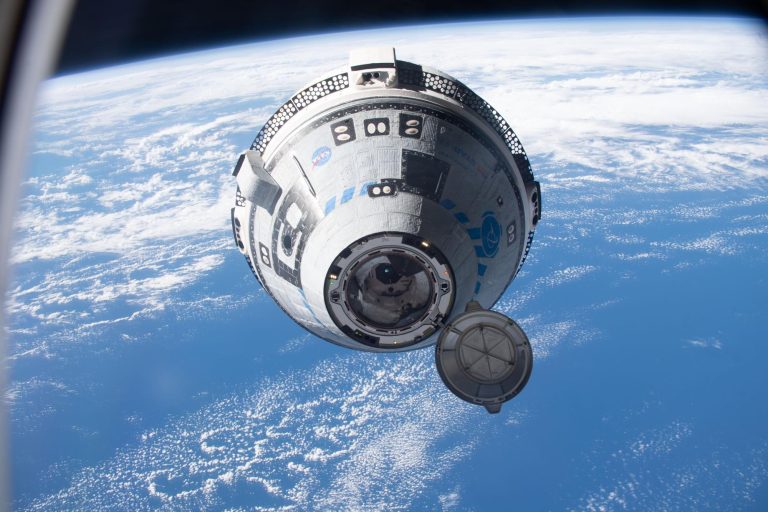
NASA and Boeing will host a media teleconference at 2 p.m. EDT Monday, Aug. 7, to provide an update on the first astronaut flight of the company’s CST-100 Starliner to and from the International Space Station.
Audio of the teleconference will stream live on NASA’s website.
Leaders will discuss spacecraft and team readiness ahead of NASA’s Boeing Crew Flight Test – the final flight test prior to regular crewed missions to the space station on the next-generation system.
The briefing participants are:
Steve Stich, manager, NASA’s Commercial Crew Program
Joel Montalbano, manager, NASA’s International Space Station Program
Mark Nappi, vice president and program manager, CST-100 Starliner, Boeing
To participate in the call, media must RSVP no later than one hour prior to the start of the event to: [email protected].
The Starliner spacecraft will launch on a United Launch Alliance Atlas V rocket from Space Launch Complex-41 at Cape Canaveral Space Force Station in Florida, returning about a week later in White Sands, New Mexico.
The flight will carry two NASA astronaut test pilots, Butch Wilmore and Suni Williams, on the demonstration flight to prove the end-to-end capabilities of the Starliner spacecraft.
Following a successful test flight with astronauts, NASA will begin the final process of certifying the Starliner spacecraft and systems for regular crew rotation flights to and from the space station.
Find out more about NASA’s Commercial Crew Program at:
https://www.nasa.gov/commercialcrew
-end-
Joshua Finch Headquarters, Washington 202-358-1100 [email protected]
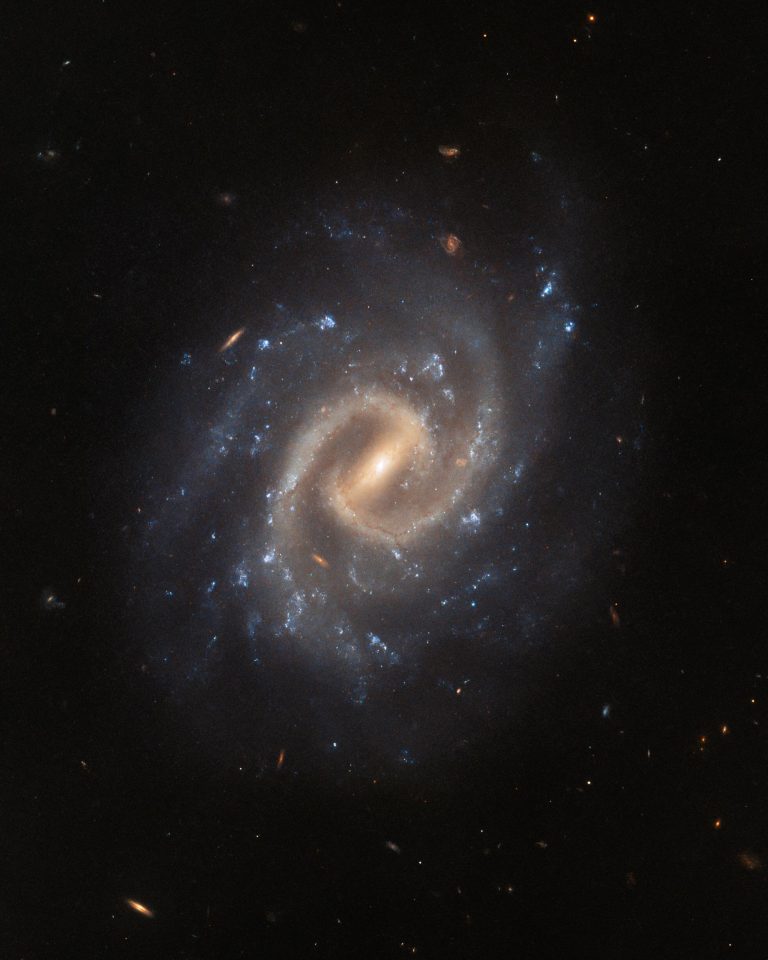
The tranquil spiral galaxy UGC 12295 basks leisurely in this image from the NASA/ESA Hubble Space Telescope. This galaxy lies around 192 million light-years away in the constellation Pisces and is almost face-on when viewed from Earth, displaying a bright central bar and tightly wound spiral arms.
Despite its tranquil appearance, UGC 12295 played host to a catastrophically violent explosion – a supernova – detected in 2015. Supernovae are the explosive deaths of massive stars and are responsible for forging many of the elements found here on Earth.
Two different teams of astronomers used Hubble’s Wide Field Camera 3 to observe UGC 12295 and sift through the wreckage of this vast stellar explosion. The first team examined the supernova’s detritus to better understand the evolution of matter in our universe.
The second team of astronomers also explored the aftermath of UGC 12295’s supernova, but their investigation focused on returning to the sites of some of the best-studied nearby earlier supernovae. Hubble’s keen vision can reveal lingering traces of these energetic events, shedding light on the nature of the systems that host them.
Text credit: European Space Agency (ESA) Image credit: ESA/Hubble & NASA, A. Filippenko, J. Lyman
Media Contact:
Claire Andreoli NASA’s Goddard Space Flight Center, Greenbelt, MD [email protected]
By: Andrea Gianopoulos Originally published at NASA
NASA is elevating its digital platforms for the benefit of all by revamping its flagship and science websites, adding its first on-demand streaming service, and upgrading the NASA app. With these changes, everyone will have access to a new world of content from the space agency.
Users can access the early, in-progress preview of the beta website now and are encouraged to visit and submit feedback at:
“Our vision is to inspire humanity through a unified, world-class NASA web experience,” said Jeff Seaton, chief information officer at the agency’s headquarters in Washington. “NASA’s legacy footprint presents an opportunity to dramatically improve the user experience for the public we serve. Modernizing our main websites from a technology standpoint and streamlining how the public engages with our content online are critical first steps in making our agency’s information more accessible, discoverable, and secure.”
Credits: NASA
This new web experience will serve as an ever-expanding yet consolidated homebase for information about the agency’s missions and research, climate data, Artemis updates, and more. The updated nasa.gov and science.nasa.gov websites will provide a connected, topic-driven experience, with a common search engine, integrated navigation, and optimized publishing capabilities in a modernized and secure set of web tools.
NASA will continue to update and improve the beta site on a rolling-basis as it receives feedback from website visitors. Once fully launched, the online content from a selection of popular agency websites will be included within this new experience to ensure easier, integrated access to NASA information currently found across the agency’s many websites.
Later this year, NASA also will launch its new streaming platform, NASA+., and upgrade the NASA app. Through the ad-free, no cost, and family-friendly streaming service, users will gain access to the agency’s Emmy Award-winning live coverage and views into NASA’s missions through collections of original video series, including a handful of new series launching with the streaming service.
“We’re putting space on demand and at your fingertips with NASA’s new streaming platform,” said Marc Etkind, associate administrator, Office of Communications, NASA Headquarters. “Transforming our digital presence will help us better tell the stories of how NASA explores the unknown in air and space, inspires through discovery, and innovates for the benefit of humanity.”
NASA+ will be available on most major platforms via the NASA App on iOS and Android mobile and tablet devices; streaming media players such as, Roku, Apple TV, and Fire TV; and on the web across desktop and mobile devices.
Following the launch of all new digital platforms, NASA will continue to connect additional agency websites and multimedia libraries into this new experience to continually streamline all the information shared across its centers, missions, and programs. With an enhanced digital presence, NASA will share science, research, exploration, and innovation with the world through cohesive platforms.
“From exoplanet research to better understanding Earth’s climate and the influence of the Sun on our planet along with exploration of the solar system, our new science and flagship websites, as well as forthcoming NASA+ videos, showcases our discovery programs in an interdisciplinary and crosscutting way, ultimately building stronger connections with our visitors and viewers,” said Nicky Fox, associate administrator, Science Mission Directorate, NASA Headquarters.
To keep up with the latest news from NASA and learn more about the agency, visit NASA’s current flagship site.
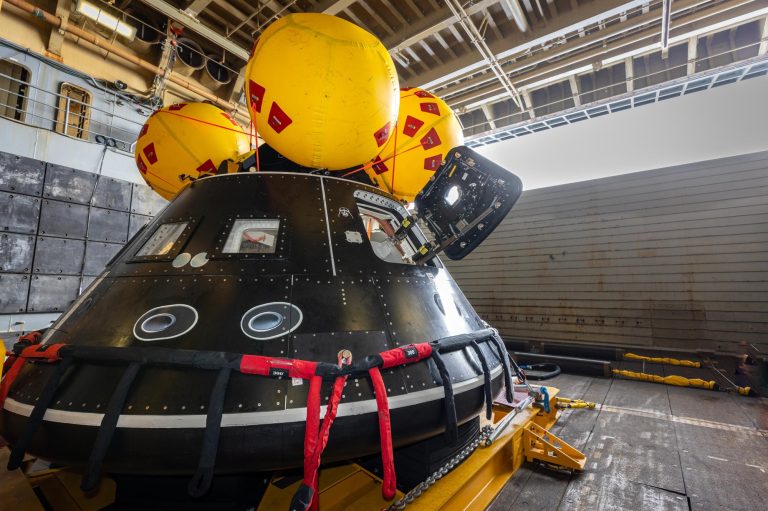
Aboard the USS John P. Murtha, NASA and Department of Defense personnel practice recovery operations for Artemis II in July. A crew module test article is used to help verify the recovery team will be ready to recovery the Artemis II crew and the Orion spacecraft. Credits: NASA/Frank Michaux
Media are invited to see the new test version of NASA’s Orion spacecraft and the hardware teams will use to recover the capsule and astronauts upon their return from space during the Artemis II mission. The event will take place at 11 a.m. PDT on Wednesday, Aug. 2, at Naval Base San Diego.
Personnel involved in recovery operations from NASA, the U.S. Navy, and the U.S. Air Force will be available to speak with media.
U.S. media interested in attending must RSVP by 4 p.m., Monday, July 31, to the Naval Base San Diego Public Affairs or 619-556-7359.
Teams are currently conducting the first in a series of tests in the Pacific Ocean to demonstrate and evaluate the processes, procedures, and hardware for recovery operations for crewed Artemis missions. The tests will help prepare the team for Artemis II, NASA’s first crewed mission under Artemis that will send four astronauts in Orion around the Moon to checkout systems ahead of future lunar missions.
The Artemis II crew – NASA astronauts Reid Wiseman, Victor Glover, and Christina Koch, and CSA (Canadian Space Agency) astronaut Jeremy Hansen – will participate in recovery testing at sea next year.
For more information about Artemis, visit:
https://www.nasa.gov/artemis
-end-
Rachel Kraft Headquarters, Washington 202-358-1100 [email protected]
Madison Tuttle Kennedy Space Center, Florida 321-298-5868 [email protected]
Company’s VORTEX® VR35K-A successfully completes full hot fire test testing, engine provides up to 30% more payload to orbit performance
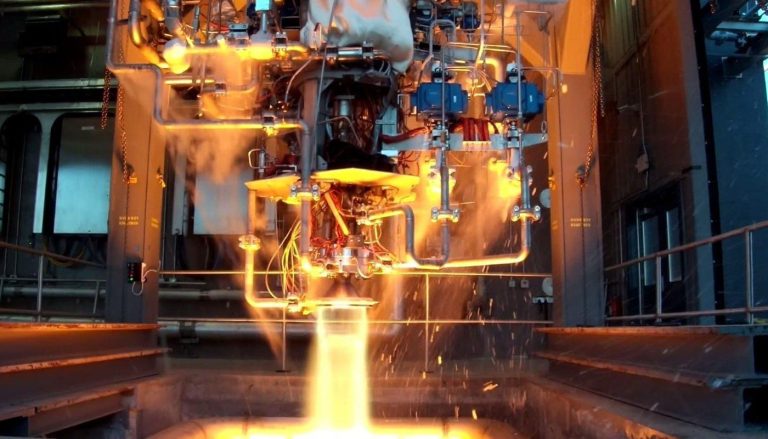
LOUISVILLE, Colo. – July 26, 2023– Sierra Space, a leading commercial space company building the first end-to-end business and technology platform in space, today announced it has been awarded a $22,605,083 firm-fixed-price contract for maturation of their Advanced Upper Stage Engine (VR35K-A). The company successfully completed a 100% hot fire test campaign of this new VORTEX® engine this spring, marking a significant maturation milestone for the upper-stage engine that Sierra Space is developing in conjunction with the Air Force Research Laboratory.
According to the U.S. Department of Defense, this contract provides for “leveraging the test data from the first Phase III Small Business Innovation Research component and integrated breadboard engine test to develop flight-weight engine component designs.” The Air Force Test Center at Edwards Air Force Base in California awarded the sole-source acquisition contract.
The VR35K-A is a liquid oxygen (LOX)/liquid hydrogen (LH2) engine that produces 35,000 lbf of thrust. The engine achieved high thrust efficiency during recent testing at the company’s propulsion test facility outside of Baraboo, Wisc. VORTEX technology will serve a critical industry need for engines that can support in-space propulsion for spacecraft orbital maneuvering and extraterrestrial landers.
“Compared with other upper-stage engines currently on the market, the VR35K-A provides more thrust and higher performance in a smaller package,” said Rusty Thomas, Sierra Space’s Chief Technology Officer and Vice President and General Manager for the Space Applications business sector. “Think of it like gas mileage – how much thrust can you get out of a given amount of propellant? Once complete, the VR35K-A will allow our launch vehicle teammates and partners to deliver up to 30% more payload mass to orbit. It will drive technology across all propulsion products at Sierra Space – from our applications and destinations sectors to space transportation with our Dream Chaser® spaceplane.”
The VR35K-A is rooted in Sierra Space’s patented VORTEX engine design technology, which promotes efficient, stable combustion while also cooling the combustion chamber. Key system attributes providing high performance and low recurring cost include innovative single-shaft turbopump assembly for simplified operation and mechanically-coupled mixture ratio control, fuel-rich staged combustion cycle to drive high chamber pressure and subsequent compactness, vortex main propellant injector to increase overall cooling capacity and heavy use of additive manufacturing to reduce production costs and schedule of complex parts.
In August 2022, Sierra Space announced the VR35K-A had passed its Critical Design Review, which allowed the company to advance into the hot fire testing campaign. Next, Sierra Space will continue to advance the VR35K-A engine by completing build of the flight-weight prototype engine to demonstrate capability and performance, and ultimately move into full engine qualification testing.
About Sierra Space
Sierra Space (www.sierraspace.com) is a leading, pure play commercial space company at the forefront of innovation and the commercialization of space in the Orbital Age™, building an end-to-end business and technology platform in space to benefit life on Earth. With more than 30 years and 500 missions of space flight heritage, the company is enabling the future of space transportation with Dream Chaser®, the world’s only commercial spaceplane, and is bringing LIFE™ (Large Integrated Flexible Environment) to low-Earth orbit with its modular, three-story commercial habitation and science platform. Both Dream Chaser and LIFE are central components to Orbital Reef, a mixed-use business park in LEO being developed by principal partners Sierra Space and Blue Origin, which is expected to be operational by the end of the decade. Sierra Space also builds and delivers a host of systems and subsystems across solar power, mechanics and motion control, environmental control, life support, propulsion and thermal control, offering myriad space-as-a-service solutions for the new space economy.
Finally, a quick look into the preeminent learning method and technique used in Artificial Intelligence research and development is not complete without neural networks.
Neural networks, inspired by the human brain, form the backbone of most modern machine learning models. There are many types of neural networks, each with its own strengths, weaknesses, and areas of application. Here are a few key types:
Feedforward Neural Network (FNN).
This is the simplest type of artificial neural network. In this network, the information moves in only one direction— forward —from the input layer, through the ‘hidden’ layers (if any), to the output layer. There are no loops in the network; it is a straight, “forward” connection.
Multilayer Perceptron (MLP).
This is a type of feedforward neural network that has at least three layers of nodes: an input layer, a hidden layer, and an output layer. Each node in a layer is connected to each node in the next layer. These are widely used for solving problems that require supervised learning.
Convolutional Neural Network (CNN).
These are primarily used for image processing, classification, segmentation and also for other auto-correlated data. A CNN uses a variation of the multilayer perceptrons and contains one or more convolutional layers, pooling layers and then followed by one or more fully connected layers.
Recurrent Neural Network (RNN).
Unlike feedforward neural networks, RNNs have ‘feedback’ connections, allowing information to be passed from one step of the network to the next. This makes them ideal for processing sequences of data, like time series data, speech, or text.
Long Short-Term Memory (LSTM).
This is a special type of RNN that is capable of learning long-term dependencies in data. This is particularly useful in time series prediction problems where context is important for predicting future values.
Gated Recurrent Unit (GRU).
GRU is a type of RNN that is similar to LSTM but uses a different gating mechanism and is computationally more efficient.
Radial Basis Function Network (RBFN).
This is a type of feedforward neural network that uses radial basis functions as activation functions. It has an input layer, a hidden layer, and an output layer.
Generative Adversarial Network (GAN).
This is a class of machine learning systems invented by Ian Goodfellow and his colleagues in 2014. Two neural networks contesting with each other in a game in the form of a zero-sum game framework.
Self-Organizing Map (SOM).
This is a type of artificial neural network that is trained using unsupervised learning to produce a low-dimensional, discretized representation of the input space of the training samples, called a map.
Autoencoder.
This is a type of artificial neural network used for learning efficient codings of input data. It is an unsupervised method of learning, where the network is trained to output a copy of the input. This forces the hidden layer to form a compressed representation of the input.
These different types of neural networks are designed to process different types of data, and they have different strengths and weaknesses. The choice of which to use depends on the nature of the problem you are trying to solve.